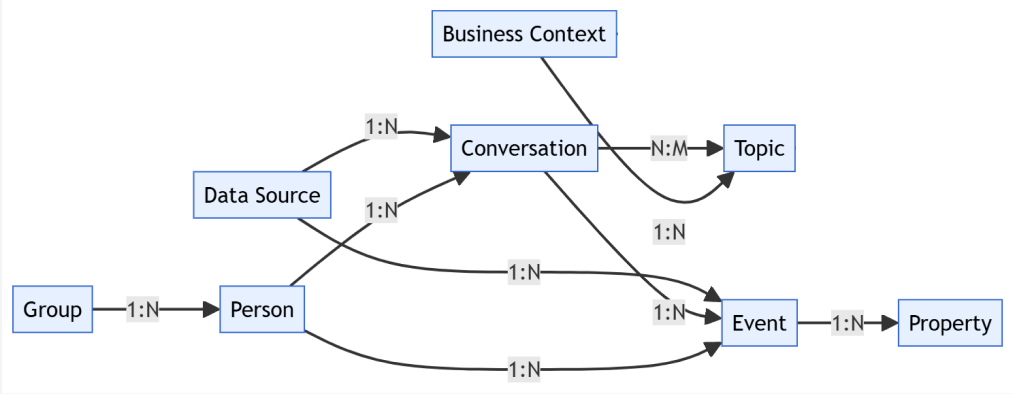
Overview & end-to-end data flow
What is Leanbase?
Leanbase empowers you to truly understand your customers on a deeper level — not just through numbers, but through meaning. By intelligently combining behavioral data from your product analytics with rich semantic analysis of customer feedback, Leanbase transforms scattered signals into clear, actionable insights. You’ll see not only what your users do, but why they do it — revealing patterns, motivations, and hidden opportunities that drive growth and loyalty.
Leanbase is built on three these concepts:
Events
Our data model is built around events — individual actions that occur at a specific moment in time.
These events can be sent through our SDKs or directly via our API, giving you full control over how data flows into the system.
Designed for flexibility, events can be automatically captured through autocapture or defined manually as custom events. You can also enrich them with additional context using properties, allowing for deeper and more meaningful analysis.
Properties
Properties are pieces of metadata you can attach to various types of data within Leanbase, giving your events richer context and meaning.
For example, you might create a custom event to represent when a user purchases an upgrade, and attach properties such as price or renewal_period. These properties let you segment and analyze your upgrade_purchased event in more detail — for instance, by comparing upgrades by price range or subscription type.
In addition to custom properties, Leanbase automatically adds useful contextual data to events, such as:
The browser used to trigger the event
The current URL where the event occurred
The device type used
Sessions
A session represents a collection of events that occur during a single interaction period between a user and your product or website.
Each unique user can have multiple sessions over time, and every session is made up of many individual events that capture their actions and behaviors.
Sessions themselves can also carry valuable metadata — known as session properties — such as session duration, entry URL, or pageview count. These properties allow you to analyze how users engage with your product over time, uncovering patterns in behavior, navigation paths, and overall engagement quality.
Actions
Actions are a powerful layer built on top of events in Leanbase.
They allow you to combine multiple events and treat them as a single, unified action — making it easier to analyze user behavior across insights and dashboards.
Unlike events, which are captured through code in your product, actions are created directly within Leanbase via the data management interface or through the toolbar on your website or app.
For example, you might define an action that groups together all button clicks on your homepage that lead to the pricing page — representing a single user intent rather than multiple event types.
Actions also help you rename technical event labels into more intuitive, human-readable names that make analysis clearer and collaboration easier.
Unlike events or sessions, actions themselves don’t have properties attached. However, you can still filter and analyze actions using properties from the underlying events, sessions, or other data types tracked in Leanbase.
Person profiles
In Leanbase, every user of your product is represented by a person profile, which serves as the central record linking all their events, sessions, and actions together.
Each person profile contains properties — data points that describe who the user is and how they interact with your product. Some of these properties are automatically collected, such as:
Browser details
Geo IP data
Referrers
UTM values
You can also define your own custom properties to enrich these profiles. For instance, when a user upgrades to a paid plan, you might add a property called paid_tier to capture the specific plan details. These custom attributes are fully accessible in your reports, filters, and data tables, helping you analyze user behavior in richer context.
To ensure precise tracking, every person profile needs a distinct identifier. In practice, a single profile may include multiple identifiers over time — for example, an anonymous ID created before the user logs in, a user ID assigned after authentication, and other client or backend-generated IDs. Leanbase automatically merges these identifiers into one cohesive profile, giving you a complete and accurate view of each user’s journey.
Cohorts and groups
In Leanbase, there are two primary ways to analyze collections of users:
Cohorts – Dynamic or static groups of users who share common characteristics or behaviors. For example, you might create a cohort of users who signed up in the past 30 days or those who have completed a specific action like making a purchase. Cohorts update automatically when users meet (or stop meeting) the defined criteria, giving you real-time segmentation.
Groups – Aggregations of events tied to a shared entity, such as a company, team, or organization. Instead of analyzing individual users, groups let you measure product usage and outcomes at a higher level — ideal for B2B analytics where multiple users interact under a single account.
Cohorts
Cohorts in Leanbase let you effortlessly group users who share common traits, behaviors, or conditions — such as completing a specific action or possessing a particular property.
For instance, if you want to identify all users in your paid tier, you could create a query for every profile where the paid_tier property is set. Leanbase would then generate a cohort — an automatically updating list that reflects your current paid customer base in real time.
Once created, cohorts become a powerful tool you can apply across Leanbase to refine analysis, personalization, and targeting. You can use cohorts to:
Explore trends, funnels, retention, user paths, stickiness, and lifecycle insights
Apply as filters on any product analytics dashboard
Target feature flags, experiments, or user surveys
Filter session replays and create custom playlists
Narrow down live event streams on the Activity page
Groups
Alternatively, you may want to understand how users behave collectively — not just as individuals, but as part of a larger entity. That’s where groups come in.
By defining groups in Leanbase, you can aggregate and analyze events across multiple person profiles to uncover patterns of collective behavior. This is especially valuable if your product serves organizations with several users under the same account, and you want to evaluate how the company as a whole interacts with your product.
Groups are also essential for analyzing account-level retention, helping you measure how long an organization continues to engage with your product before churning — a critical insight for B2B and SaaS teams.
To use groups, you’ll need to enable person profiles and activate the Group Analytics add-on in Leanbase. Once set up, you can view, filter, and compare group activity just like you would with individual users — giving you a complete picture from both the micro (user) and macro (account) levels.
Topics
In Leanbase, topics represent the key insights automatically extracted from user conversations — revealing what people are truly talking about across channels. Each conversation can touch on multiple topics, capturing the full context of user needs, issues, or ideas. Likewise, a single topic can span many conversations, grouping related discussions under one unified theme. This bi-directional structure helps you identify recurring patterns, emerging pain points, or trending requests at scale — turning scattered feedback into clear, actionable understanding of what matters most to your customers.
Conversation
In Leanbase, conversations encompass every form of customer interaction — including messages, reviews, feedback, and support tickets — all seamlessly synced from multiple platforms into one unified workspace. From these conversations, Leanbase’s AI automatically extracts topics, which represent the recurring themes, insights, or issues your customers talk about most. Each conversation can contain several topics, while a single topic can aggregate insights from many conversations across different channels. This structure allows you to connect the dots between fragmented customer touchpoints, uncover hidden trends, and gain a holistic understanding of your users’ voices at scale.
Business Context
In Leanbase, the business context serves as the AI’s core memory of your organization — capturing essential information such as your company details, products, services, goals, and terminology. This context ensures that Leanbase AI understands not just what users are saying, but how it relates to your business. By grounding every analysis, insight, and response in your company’s real-world context, Leanbase delivers interpretations that are more accurate, relevant, and aligned with your unique operations and strategy.
Data sources
In Leanbase, data sources are the channels from which customer interactions — such as tickets, messages, reviews, and feedback — are automatically synced into the platform. These can include support tools, social media, review sites, chat systems, or any other communication channel your customers use to engage with your business. By unifying all these data sources into one place, Leanbase gives you a complete, centralized view of every customer touchpoint — enabling deeper insights, faster analysis, and more connected decision-making.